UrOwn Orange
UrOwn
Launching Discount
Back to Home

All Products

Showing 6 of 9 design

01
MacOS Portfolio

MacOS Portfolio

Rp 518.000

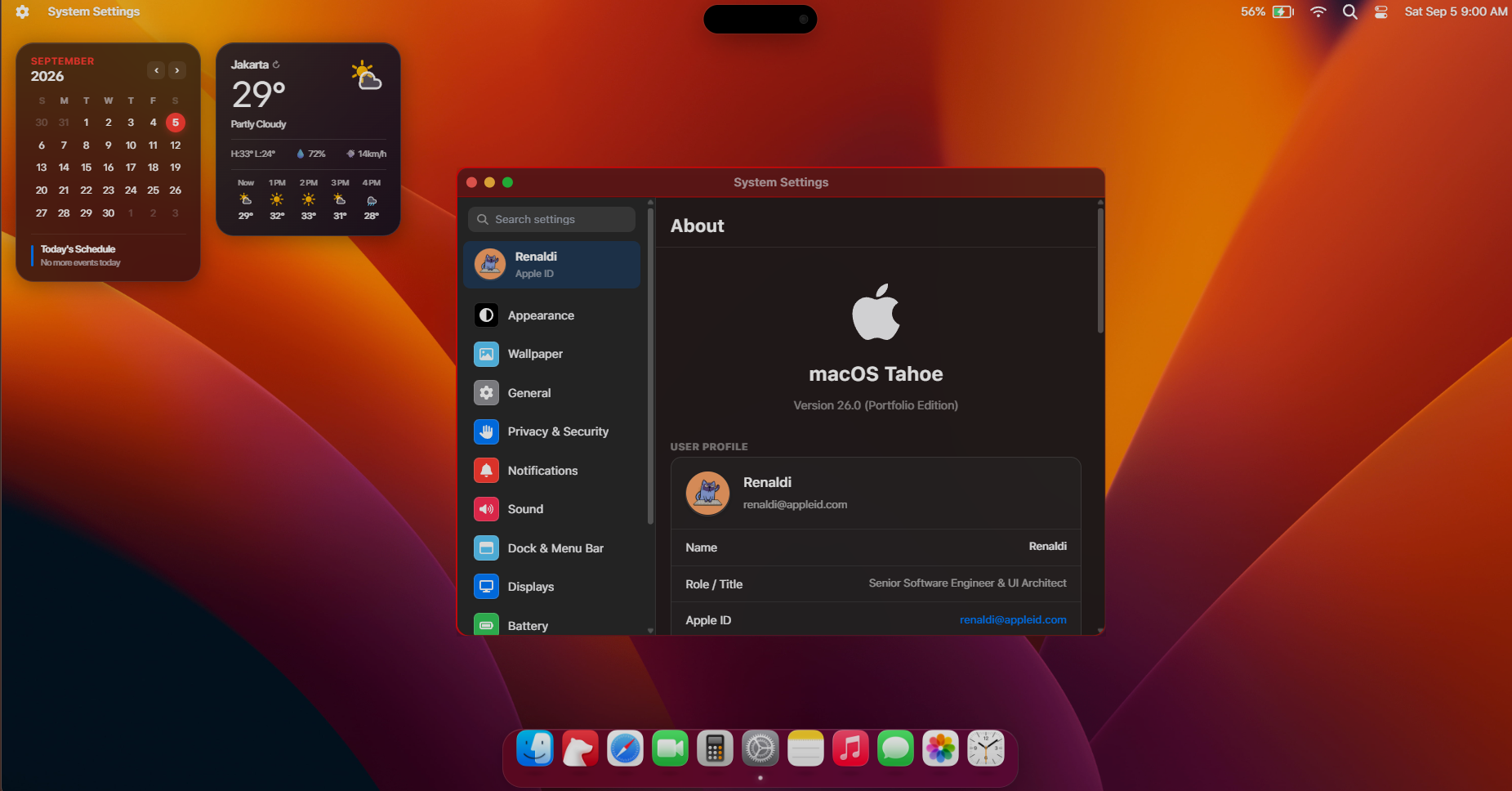
macOS Tahoe Portfolio is an interactive web-based portfolio template that replicates the macOS Tahoe operating system inside a web browser. The template is built with React 19, TypeScript, Vite, UnoCSS, Framer Motion, and Zustand. All content is managed through Sanity, a headless CMS. Site owners can update their bio, add projects, publish blog posts, add work history, and change desktop wallpapers directly from the Sanity Studio dashboard without editing the code. Key features Desktop interface: Functional top menu bar with live clock, control center, and status indicators. Animated application dock with magnification on hover. Native desktop utilities including launchpad, notification center, dynamic island, and spotlight search. Window management: Draggable, resizable, and stackable application windows powered by react-rnd. Working macOS-style window controls to minimize, maximize, and close windows. Dynamic window focus layering when clicking between active tasks. Built-in applications: Safari: A structured project directory to present client work and live deployments with category filtering. Bear: A technical note and blog reader supporting Markdown, KaTeX math typesetting, and code syntax highlighting. Finder: A file browser for navigating documents, images, and downloadable assets such as a PDF resume. Photos: An image gallery for photography or UI designs, organized with date, location tags, and favorite badges. Music: An audio player with customizable tracklists, album art displays, and a functional progress scrub bar. Messages: An interactive chat simulator suitable for presenting client reviews or an interactive FAQ. FaceTime: A camera application that connects directly to the visitor's local webcam. Calculator and Clock: A working macOS-style arithmetic calculator and a world clock with timers. System Settings and About This Mac: User profile cards, career timeline, education credentials, resume downloads, and appearance preferences. Architecture and CMS tooling: Dedicated /studio route for the embedded Sanity Studio editor. A pre-configured seed script to populate sample data on initial setup. Structured SEO head components supporting Open Graph images and JSON-LD schema markup. Advantages Higher visitor engagement: Visitors interact with windows, search files, and play audio rather than scanning a standard single-page layout. Non-technical maintenance: Content updates take place in an intuitive admin form. Updating project screenshots, descriptions, or resume links does not require touching source code or rebuilding the repository manually. Fast page delivery: Built with Vite and UnoCSS, keeping asset sizes small and ensuring animations remain fluid on modern browsers. Clean, modular code: Written in strict TypeScript with isolated React components, making it straightforward for developers to add new windows or custom widgets. Uniqueness Complete OS metaphor: While most portfolios rely on vertical scrolling layouts, this template implements a functional desktop environment with its own file tree, search utility, and window manager. Accurate interface details: Includes blurred frosted-glass window materials, realistic window drop shadows, system sounds, and responsive desktop shortcuts. Unified multi-disciplinary layout: Allows professionals to present software projects (Safari), technical writing (Bear), visual assets (Photos), and formal credentials (About This Mac) inside a single

Portfolio
02
BlueBoard Portfolio

BlueBoard Portfolio

Rp 480.000

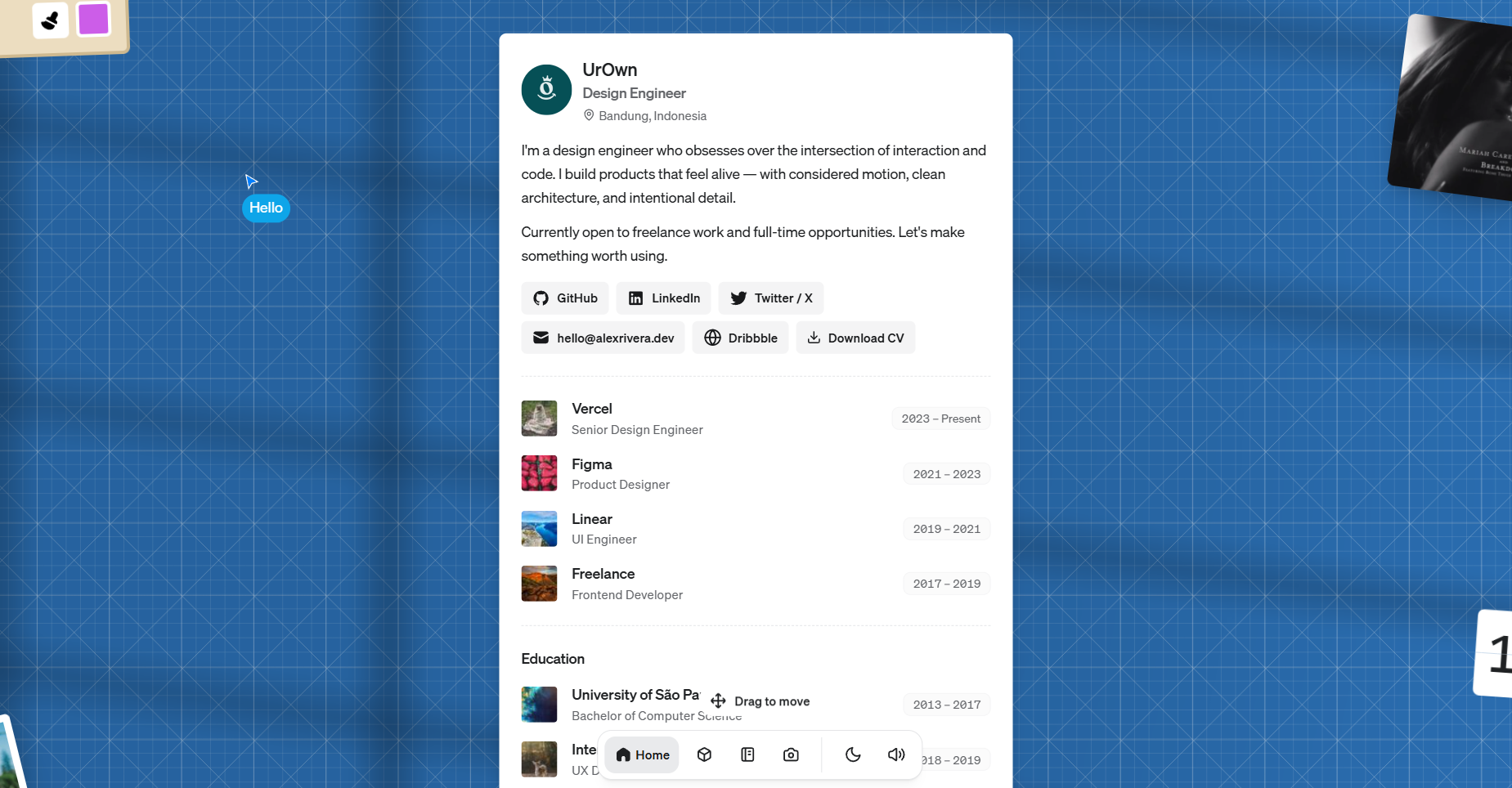
Most portfolio templates put your work in a grid and call it done. Folio takes a different approach: the homepage is a 3200×2760px draggable canvas, a virtual moodboard that visitors can pan around and interact with. Photos appear as Polaroid cards with physics-based drag and 3D tilt. Books open on hover. Albums slide their cover art aside to reveal a spinning vinyl. Stickers scatter across the surface. Content goes in through an embedded Sanity Studio at /studio — no code edits needed to update your name, add a project, or change what's playing. What's on the canvas The layout is generated automatically by a seeded placement algorithm. Add photos, books, albums, and stickers in Sanity, and each item gets a non-overlapping position with a slight random rotation. The algorithm runs the same seed for the same dataset, so the layout stays stable between visits but shifts naturally when you add or remove content. Fixed on the canvas: an about card (name, role, bio, work history, education, social links, downloadable CV), a real-time flip clock, a turbulence drawing board, and a scratch card. Everything else, your photos, albums, books, and stickers, lands in the remaining space. The interactions The turbulence canvas is a freehand drawing board where your strokes visually wobble in real time. A sine-field runs over every point on every rAF tick, so lines seem to melt and drift. On first scroll-into-view, it draws the word "hello" point by point. The scratch card overlays a hidden image with a canvas layer. Users scratch it away. Once 50% of pixels are cleared, the overlay fades and a small celebration animation plays. The about card area has a floating cursor that wanders on its own, stepping through randomized waypoints at varying speeds with occasional pauses. The flip clock runs in real time. Only the digit that changes each second triggers the 3D card-flip animation. The dock's chess icon has a live 3D scene behind it: animated cubes ray-marched in GLSL using Three.js, with FBM-based nebula background and Blinn-Phong lighting. It responds to mouse position. Content management Everything editable lives in Sanity. The schema covers: site config, work experience, education, social links, projects, blog posts, photos (with gallery ordering and a "show on home" flag), albums (with audio file upload), books, and stickers. Blog and project bodies support headings, blockquotes, inline images, YouTube embeds, code blocks (Shiki syntax highlighting, separate light and dark themes), and tables. The Studio is embedded in the app at /studio, no separate deployment. When you publish in Sanity, a webhook hits /api/revalidate and only the relevant Next.js pages update. Photo gallery The /photos page opens a lightbox carousel on click. Caption and location text automatically switches between light and dark based on the image's perceived luminance, sampled from the bottom-left corner using the ITU-R BT.709 formula. The dock A floating bottom bar persists across all pages. It has nav icons that switch between filled and outlined states with a spring-animated label, a dark/light mode toggle with sound effects, an audio on/off toggle, and a music player that slides out when an album is playing. UI sounds come from use-sound Blogs and projects Both content types have listing pages and detail pages with a sticky Table of Contents sidebar auto-generated from your headings. JSON-LD structured data (Article or CreativeWork, plus BreadcrumbList) on each detail page. SEO and performance generateMetadata() runs on every page and outputs Open Graph and Twitter Card tags from Sanity data. The sitemap and robots.txt generate automatically. The robots.txt blocks known AI training crawlers (GPTBot, Claude-Web, Google-Extended, and others). The home page fetches all 8 content types in a single GROQ query. Vercel Analytics and Speed Insights are wired in. Stack Next.js 16, React 19, TypeScript 5.5, Sanity v3, Framer Motion, Three.js, Tailwind CSS 3.4, Radix UI, Shiki, Embla Carousel, use-sound.

Portfolio
03
Serif Portfolio

Serif Portfolio

Rp 380.000

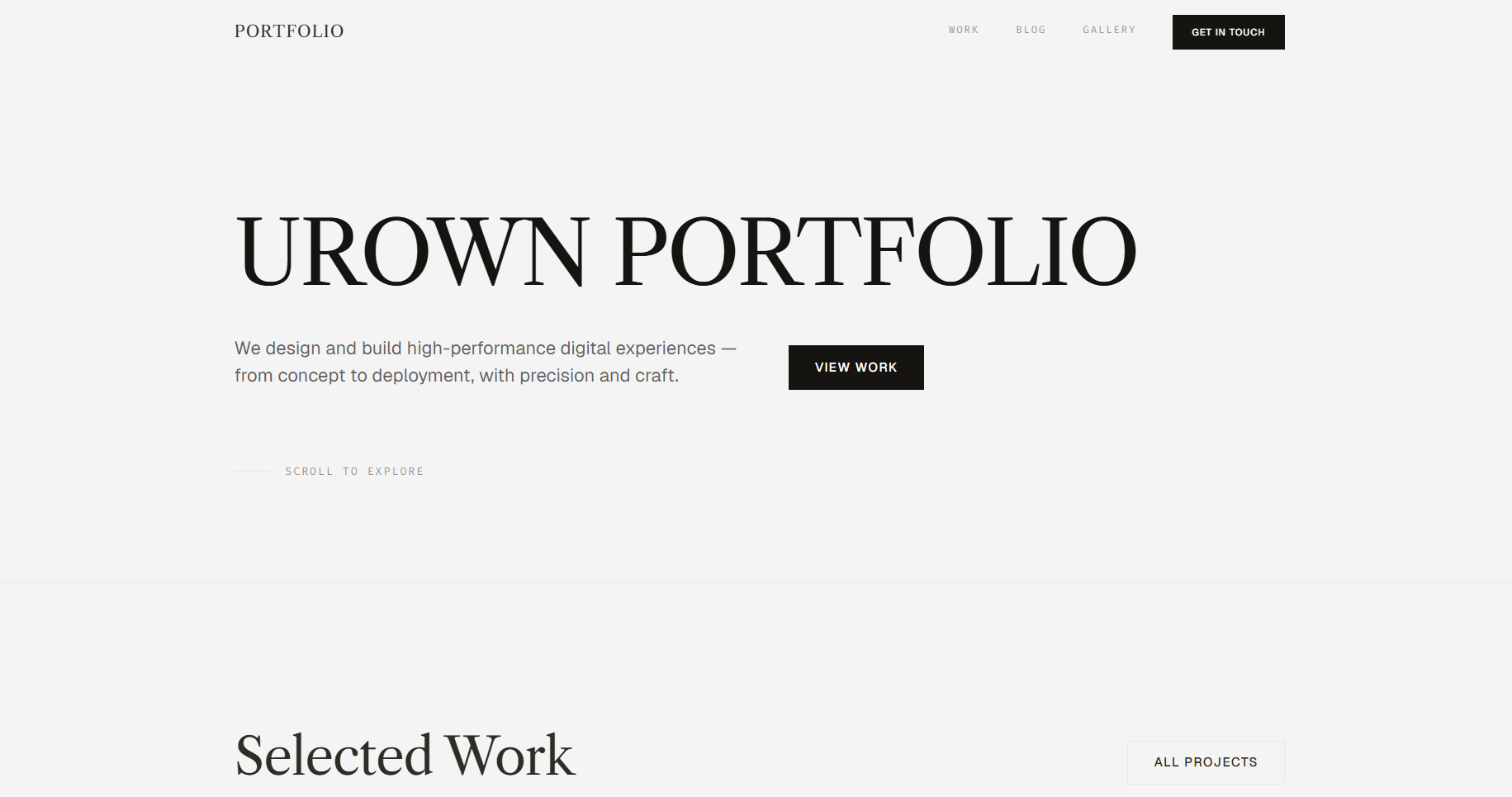
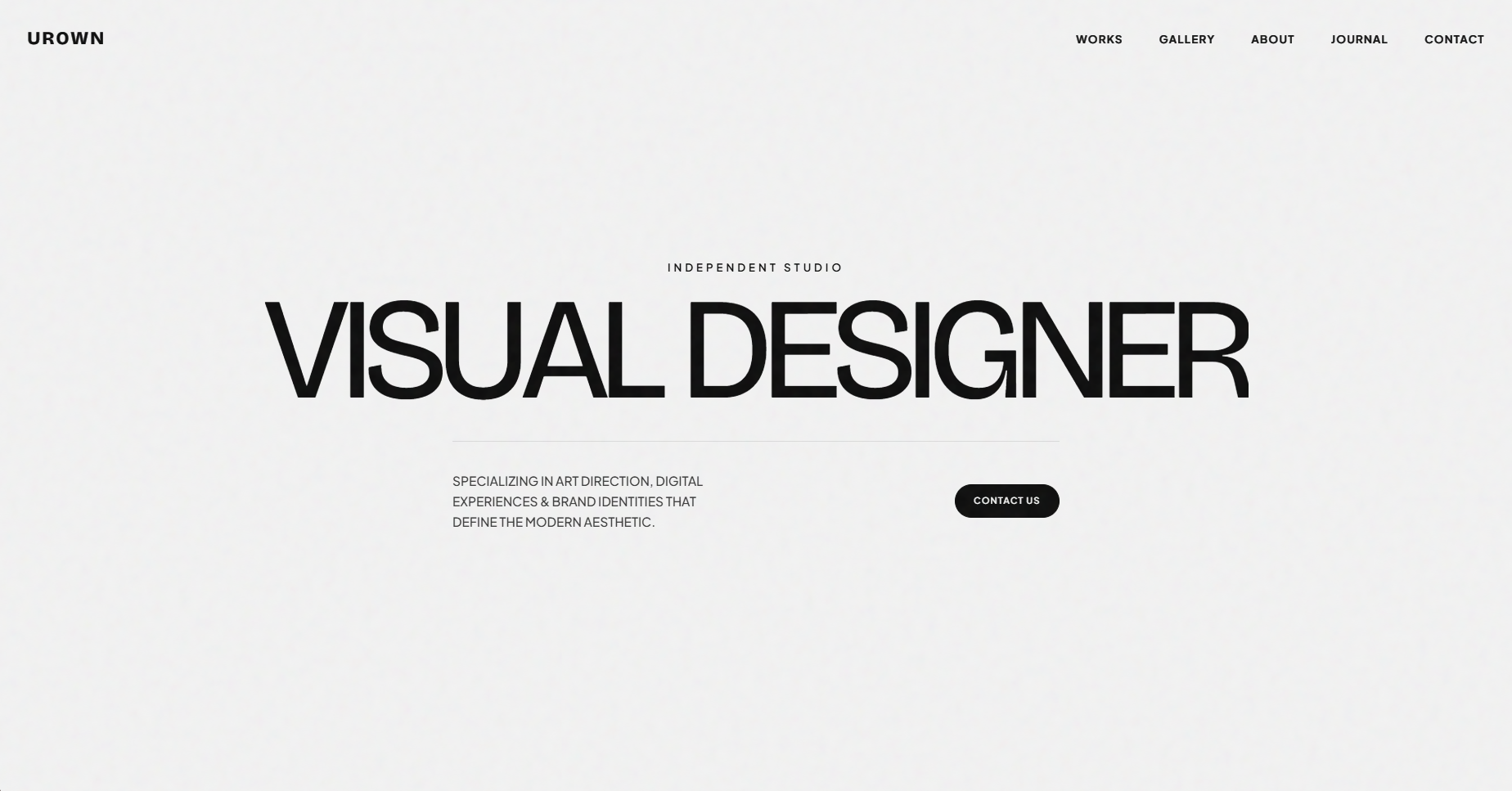
A refined portfolio website template for designers, creative professionals, and independent studios, built to present selected work, share ideas, and establish a distinctive creative presence. The editorial layout combines projects, personal information, journal entries, and visual references into a structured portfolio experience. All content can be managed through a connected CMS without editing the code. Product description A single-page editorial portfolio website with dedicated pages for projects and journal posts. It is designed for visual designers, art directors, creative developers, photographers, and independent creatives who want a polished online presence centered around their work. The homepage is organized into carefully spaced sections for selected projects, an about profile, professional experience, education, journal entries, and a visual archive. The restrained typography, generous whitespace, and dark contrast sections give the website a sophisticated editorial character while keeping the focus on the content. Content such as project information, images, biography, experience, journal posts, and visual archive items can be managed through a connected CMS. You can update your portfolio from a web-based dashboard without modifying the source code. Key features Editorial hero section. A large typographic introduction immediately communicates your creative identity and establishes a strong visual first impression. Selected work showcase. Highlight your most important projects in a clean two-column grid with large imagery and concise project titles. A separate Works archive provides access to the complete collection. About Me section. Introduces your background through a profile image, biography, professional experience, and education. The dark background creates a strong visual transition from the main portfolio section. Experience & education timeline. Present your professional background, previous roles, and educational history in a structured editorial layout that is easy to scan. Journal section. Share articles, thoughts, processes, and creative insights through a minimal list-based journal layout. Each post can be opened as an individual article. Visual archive. Display photography, references, experiments, or personal visual collections in a compact image grid. The section provides a secondary space for work that does not belong in the main project archive. Project detail pages. Give individual projects their own dedicated page where you can present project descriptions, imagery, process, and additional information. Blog / journal detail pages. Each article has its own reading experience with structured typography and editorial spacing. Strong typographic hierarchy. Large serif headlines, small uppercase labels, restrained navigation, and generous whitespace create a refined editorial aesthetic. Dark contrast sections. Selected sections use a near-black background to create visual rhythm and separate personal information from the main portfolio content. Contact call-to-action. A dedicated closing section encourages visitors to start a conversation or discuss a potential project through a simple contact button. Responsive layout. The editorial grid and typography adapt across desktop, tablet, and mobile screen sizes while maintaining the visual hierarchy. CMS-driven content. Projects, journal posts, visual archive items, profile information, experience, education, and other editable content can be managed through the connected CMS without changing the code. Pages included Home — Hero, selected works, about, experience, education, journal, visual archive, and contact CTA. Works — Complete project archive. Works detail — Individual project / case study page. Journal — Complete article archive. Journal post — Individual article page. Visual Archive — Collection of personal or creative visual references. Studio — CMS dashboard for managing portfolio content. Design style Minimal and editorial, with an off-white background, near-black typography, and subtle neutral tones. Large serif headlines create a sophisticated magazine-inspired character, while small uppercase labels and restrained sans-serif text provide structure and hierarchy. The layout uses generous whitespace, thin dividers, asymmetric spacing, and carefully proportioned image grids to create a calm and premium visual experience. A full-width dark section introduces contrast around the About area, while the final CTA uses a warm neutral background to create a distinct closing moment. The overall design is intentionally restrained, allowing the work, typography, photography, and personal identity to become the primary visual elements.

Portfolio
04
Architectural Blueprint Store

Architectural Blueprint Store

Rp 428.000

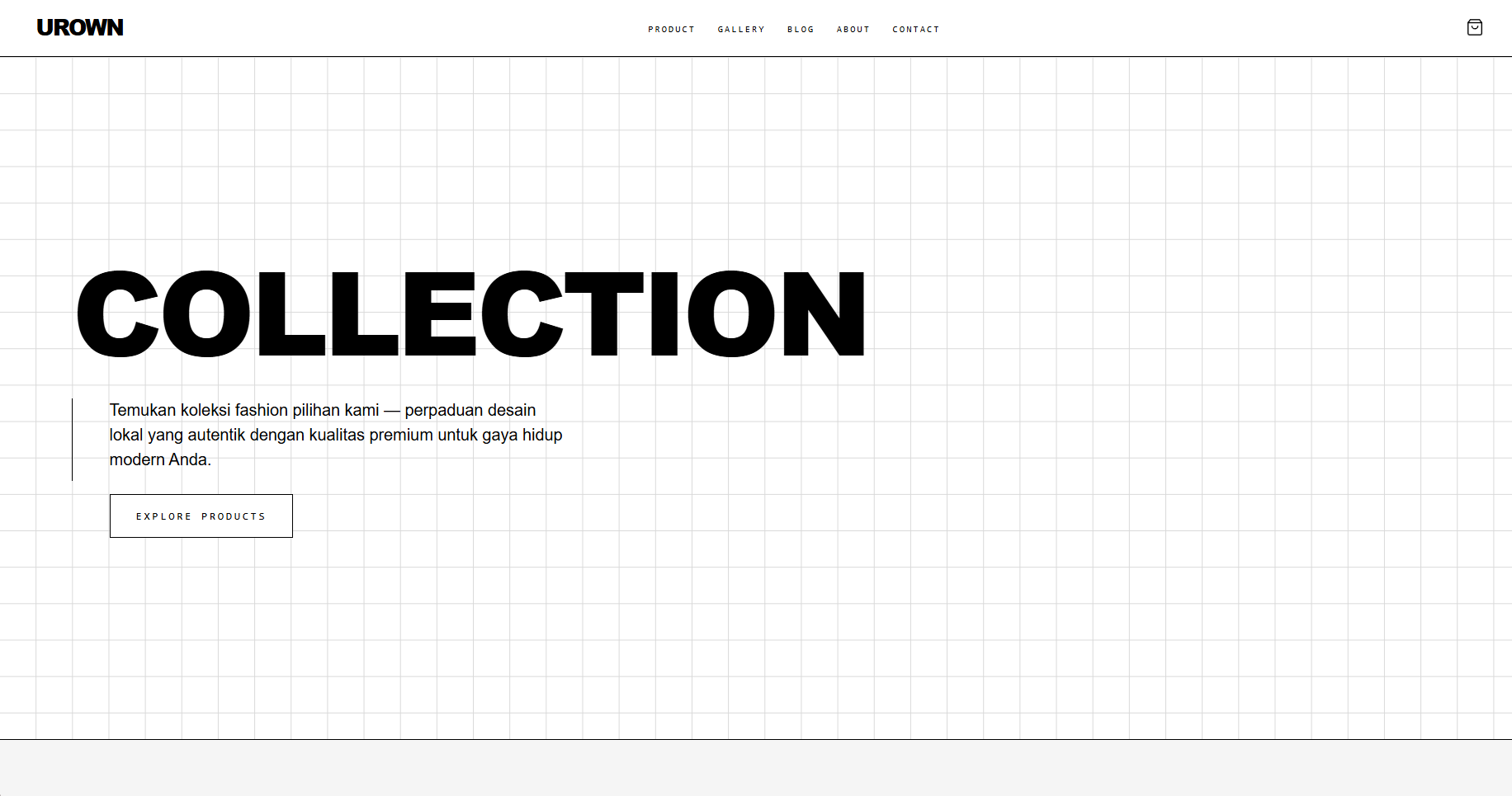
A modern web shop template featuring a high-fashion neo-brutalist aesthetic, powered by cutting-edge technologies including Next.js 16 (App Router), React 19, Tailwind CSS v4, and Sanity Studio v6 (Headless CMS) with an Instant WhatsApp Checkout system. Overview This template is specifically designed for independent fashion brands, streetwear labels, product curators, designers, and direct-to-consumer (D2C) stores looking to stand out from generic e-commerce platforms. Combining an Editorial Magazine aesthetic with the bold structured lines of Neo-Brutalist Architecture, it delivers an exclusive, avant-garde, and high-end feel to prospective buyers. All store content—ranging from product catalogs and variants to gallery lookbooks, journal articles, and store identity—can be effortlessly managed without touching code via the built-in Sanity Studio. Aesthetic & Visual Style The design blends bold architectural hairlines, high-contrast monochromatic accents, and asymmetrical magazine-style grid layouts inspired by Paris and Tokyo fashion culture. It utilizes a curated typography trio featuring Cabinet Grotesk for bold display headings, Satoshi for clean body text, and Azeret Mono for technical accents like price tags and SKU badges. The visual experience is further elevated with an optional blueprint gridlines overlay, an adaptive monochrome color palette (Light & Deep Dark Jet Theme), and smooth micro-interactions including product hover-reveals, sliding cart drawers, animated lightboxes, and interactive toast notifications. Core E-Commerce & Online Store Features The template features a direct WhatsApp Checkout system that allows shoppers to assemble items in a sliding Shopping Bag Drawer and generate a neatly formatted Markdown summary sent straight to your business WhatsApp number upon clicking "Proceed to Buy". This approach eliminates payment gateway fees while boosting conversions and facilitating personal customer support. For quick browsing, customers can utilize an interactive Quick View pop-up modal to inspect image galleries, select variants, and add items to the cart without refreshing the page. The catalog is powered by real-time search, automated category tagging, dynamic multi-sorting (by price, name, or default order), and clean pagination. Each Product Detail Page (PDP) provides an editorial experience equipped with multi-image interactive galleries with zoom features, a dynamic Table of Contents with a sticky sidebar for long descriptions, flexible variant systems (standard or custom sizes), related product recommendations, strikethrough compare-at pricing, and inventory status badges. The Rich Portable Text body supports size chart tables, embedded YouTube demo videos, and editorial quotes. Beyond products, the template includes a visual Lookbook gallery with a Fullscreen Lightbox supporting keyboard navigation, an editorial Journal/Blog section with an automated Table of Contents for brand storytelling, and a multi-currency system with built-in support for IDR, USD, and SGD regional price formatting across the store. No-Code Content Management (Headless Sanity CMS) All store content can be edited at any time by the store owner through the integrated Sanity Studio v6 dashboard located at the /studio route. The CMS allows full management over site settings (store name, retina logos, favicon, Open Graph thumbnails, and currencies), homepage section layouts (Hero text, banners, About section, gallery, contact details), and product/category listings. Thanks to SanityLive integration, content updates in the CMS reflect instantly on the live website without requiring a re-deploy. Technical Specifications & Performance Built on Next.js 16 (App Router) with React 19 and 100% full TypeScript, the core engine leverages Server-Side Rendering (SSR) and Server Components for ultra-fast performance. Styling is driven by Tailwind CSS v4 using PostCSS and modern CSS tokens. The template is fully optimized for SEO and Answer Engine Optimization (AEO), featuring auto-generated sitemap.ts and robots.ts files, dynamic Open Graph and Twitter Cards for social media previews, and complete JSON-LD Structured Data schemas (Product, Offer, BreadcrumbList, Article, WebSite, and Organization) to maximize visibility across Google and AI Search engines such as Perplexity, ChatGPT, and AI Overviews. Unit and integration testing setup is pre-configured with Vitest. Target Audience & Included Assets This solution is ideal for apparel and streetwear labels, aesthetic jewelry and bag shops, interior design studios, creative merchandise outlets, and any D2C business that prioritizes an elevated visual identity combined with personalized WhatsApp ordering. Purchasers receive the complete source code (Next.js 16, React 19, Tailwind v4, TypeScript), full Sanity Studio v6 schema configurations, an automated seeder script to populate initial dummy data via CLI, and step-by-step documentation covering local execution as well as deployment to Vercel and Sanity Cloud.

Shop
05
Modern Atelier Portfolio

Modern Atelier Portfolio

Rp 380.000

A portfolio website template for visual designers and art directors, built to show work, share writing, and invite new projects. All content is managed through a connected CMS, no code edits needed. Product description single-page portfolio website with dedicated pages for projects and blog posts. It is aimed at visual designers, art directors, and creative studios who want a professional online presence without maintaining a custom codebase. The layout separates your work, a visual gallery, a written journal, and a contact section into distinct areas, each editable through Sanity Studio. You write and upload from a web-based dashboard; the site updates automatically. Key features Interactive hero section. The homepage opens with a full-screen title that reacts to mouse movement, with floating image cards that follow the cursor as visitors explore. Project showcase with quick preview. Selected works appear in an asymmetric grid. Visitors can open a project in a slide-up modal for a fast preview, or navigate to a full case study page. Scrolling visual gallery. A marquee strip displays gallery images in a continuous horizontal loop. Clicking any image opens a full-screen lightbox view. Blog / journal with table of contents. Each article page includes a sticky sidebar that lists headings so readers can jump between sections. About section with CV download. Displays a profile photo, biography, and separate lists for experience and education. A download button links to an external CV or resume file. Contact section. A dark, full-width call-to-action section with a direct email or link button. Copy and button URL are managed in the CMS. Custom animated cursor. A two-part cursor (dot and trailing ring) replaces the browser default across the entire site. It adapts its color when scrolling over dark sections. CMS-driven content. Every section title, text, image, and button label is editable through Sanity Studio. No code changes are needed to update the site content. Pages included Home Works (archive) Works detail (individual project / case study) Blog (archive) Blog post (individual article) Studio (Sanity CMS dashboard, embedded) Design style Clean and editorial, with a near-white background, near-black text, and a red-orange accent color. Typography is large-scale and uppercase throughout, with tight tracking. A subtle animated film grain overlay adds texture across all pages.

Portfolio
06
Binder Portfolio

Binder Portfolio

Rp 380.000

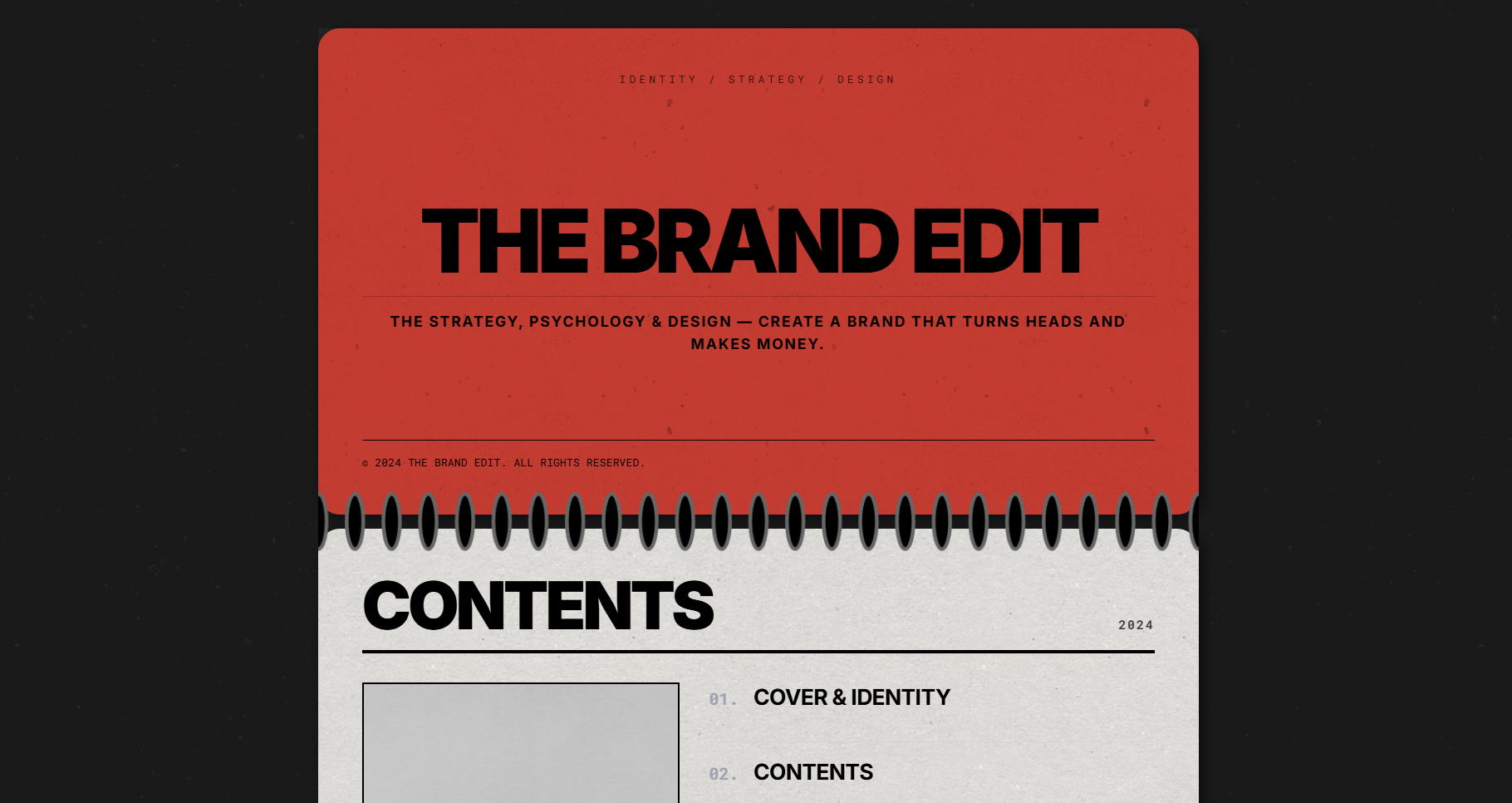
A dark editorial portfolio template built for brand identity designers and creative studios, with all content managed through a built-in CMS, no coding required after setup. Product description This is a single-page portfolio website designed for brand identity designers, graphic artists, and small creative studios. It lays out your work in a magazine-style format, with sections for your bio, selected projects, blog posts, a photo gallery, and a contact call-to-action. All the text, images, and project listings on the site are managed through a simple online content editor, so you can update your portfolio without touching any code. Key features CMS-managed content. Every section of the site (your name, about text, project list, blog posts, gallery photos, contact message) is editable from a clean online dashboard. Project pages. Each project gets its own page with a cover image and a full write-up area that supports text, images, and embedded videos. Blog. A built-in journal section lets you publish articles or case studies, each with its own dedicated page. Photo gallery. A separate gallery section displays a collection of images in a grid layout with a lightbox view. CV download. You can attach a downloadable file (such as a PDF resume) directly from the content editor. Table of contents navigation. A floating contents panel lets visitors jump to any section of the page quickly, with a mobile-friendly version included. Auto-generated SEO metadata. Page titles, descriptions, and social sharing images pull directly from your CMS content. Custom favicon support. Upload your own icon from the content editor to replace the default browser tab icon. Pages included Home (single scrolling page with all sections) Projects (full list) Project detail Blog (full list) Blog post detail Gallery Design style Dark background with warm off-white content panels, a single red accent color, and large uppercase headings. The layout uses a physical binder or printed magazine as a visual reference, with decorative spiral dividers separating each section.

Portfolio
1 / 2